Other recent blogs


In the current landscape of 2026, the transition from legacy on-premise systems to the cloud is no longer just a trend but rather a business imperative. Organizations that continue to rely on traditional SQL Server environments often find themselves hitting a "performance ceiling" where hardware costs skyrocket, and data processing speeds plummet. This playbook is designed for data leaders and architects who are evaluating a move to the Snowflake AI data cloud. By the end of this guide, you will be able to get a clear, actionable strategy for navigating the complexities of SQL Server to Snowflake migration and modernizing your entire data ecosystem.
Architectural Shift: How SQL Server and Snowflake Differ
Before diving into migration steps, it is vital to understand that you aren’t just moving data from one box to another; you are moving from a shared-hardware model to a multi-cluster, shared-data architecture. SQL Server was originally designed to run on a single physical or virtual server where CPU, memory, and disk storage are inextricably linked. On the other hand, Snowflake was built natively for the cloud, separating these layers so they can scale independently of one another.
Key Structural Differences:
- Storage vs Compute: In SQL Server, if you need more storage, you often have to upgrade the entire server, including compute you might not need. Snowflake stores data centrally in high-performance cloud storage ( like S3 or Azure Blob), and you only spin up "Virtual Warehouses" (compute) when you actually need to run a query.
- Indexing vs. Micro-partitioning: SQL Server relies heavily on manual index maintenance, fragmentation checks, and statistics updates to stay fast. Snowflake eliminates indexes entirely, instead using automatic "micro-partitioning" where data is divided into compressed, 50MB to 500MB chunks that the system optimizes without human intervention.
- Concurrency Limits: SQL Server often suffers from resource contention, where a heavy report can slow down everyone’s queries. Snowflake solves this with multi-cluster warehouses that automatically add more compute resources as more users log in, ensuring consistent performance for every department.
- Maintenance Overhead: SQL Server requires content poaching, version upgrades, and hardware refreshes. Snowflake is a data warehouse service, meaning there are no versions to manage, no hardware to buy, and no maintenance window required for the end-user.
The Strategic Case for SQL Server to Snowflake Migration
The decision to migrate SQL Server to Snowflake is frequently driven by the need for near-infinite scalability and a reduction in total cost of ownership(TCO). In traditional SQL server setups, compute and storage are tightly coupled, which means you generally have to pay for expensive hardware that sits idle during off-peak hours.
Recent industry data highlights the urgency of this shift:
- Performance Gains: Enterprises report that queries that took hours in SQL Server often execute in seconds on Snowflake, a performance leap of 200x to 300x in many cases.
- Cost Efficiency: Organizations that move to Snowflake have often realized up to a 70% reduction in hardware and maintenance costs by switching to a pay-as-you-go model.
- Market Growth: Snowflake’s product revenue is projected to hit $4.39 billion in fiscal year 2026, driven by a 27% year-on-year increase in enterprises adopting its AI and data cloud capabilities.
Different phases for migrating data from SQL Server to Snowflake.
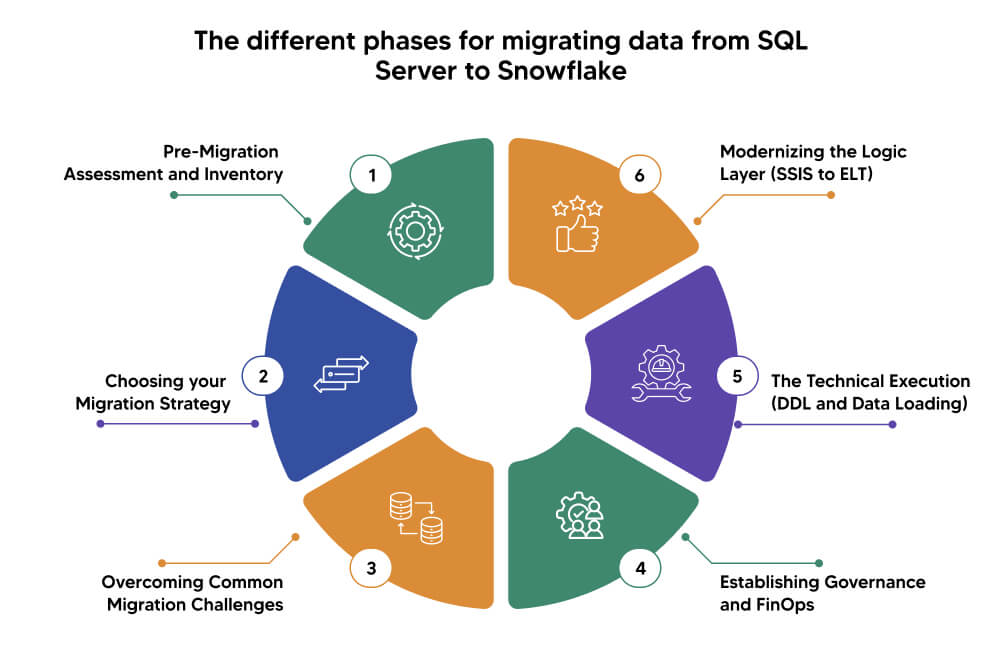
Phase 1: Pre-Migration Assessment and Inventory
Before a single byte of data is moved, you should conduct a comprehensive audit of your existing SQL server environment to identify dependencies and potential bottlenecks. A successful SQL Server to Snowflake data migration starts with a "discovery phase" where you catalog every table, view, stored procedure, and SSIS( SQL Server Integration Services) package currently available. This isn’t about technical objects; it’s about understanding the business logic and downstream applications like Power BI or Tableau that rely on this data.
Key Activities in the Assessment Phase:
- Categorize Your Workloads: Not every SQL Server database belongs in Snowflake. High-frequency transactional data (OLTP) may be better suited for Azure SQL, while analytical workloads (OLAP) are the primary candidates for Snowflake’s compute engine.
- Identify Technical Debt: Use this migration as an opportunity to clean house by identifying deprecated tables or unused reports that don’t need to be moved, thereby reducing migration time and cloud storage costs.
- Map Data Types: While many types map easily, some require additional attention. For instance, SQL Server’s DATETIME typically maps to Snowflake’s TIMESTAMP_NTZ, and MONEY should be converted to NUMBER to maintain precision.
- Document Security Requirements: Catalog your current role-based access control (RBAC) and row-level security (RLS) to ensure they can be mirrored or improved with Snowflake’s robust data governance framework.
Phase 2: Choosing your Migration Strategy
There is no one-size-fits-all approach to migrating SQL Server to Snowflake, and your choice will depend on your risk tolerance, budget, and downtime requirements. The big bang approach requires a total cutover during a single weekend, which is fast but carries a higher risk if unforeseen errors occur during the production switch. Conversely, a phased migration allows you to move one business unit or data domain at a time, ensuring each segment is fully functional before moving the next.
Proven Migration Methods:
- Lift and Shift: This is the fastest way to move, where you replicate the existing schema and data with minimum changes. While quick, it may not have Snowflake’s original performance potential, such as its ability to handle semi-structured JSON data natively, and typically requires a follow-up optimization phase.
- Refactor and Modernize: This strategy involves redesigning your data models ( e.g, moving from a start schema to a more flattened design) to take advantage of Snowflake’s columnar storage and micro-partitioning. This method yields the highest long-term ROI but requires deep expertise in data platform modernization to successfully redesign legacy models for a cloud-native environment."By re-engineering the data flow, you can eliminate legacy bottlenecks and fully integrate modern AI-driven data processing capabilities.
- Hybrid Coexistence: For massive enterprises running both systems in parallel for a period, it allows for rigorous testing and side-by-side validation of reporting accuracy before the final shutdown of SQL Server. This approach provides a safety net for business-critical reporting while the team acclimates to the new cloud-native environment and workflows. Furthermore, this strategy enables a gradual decommissioning process, significantly reducing the risk of catastrophic downtime during the final switchover.
Phase 3: Overcoming Common Migration Challenges
Despite the immense benefits of cloud modernization, migrating SQL Server to Snowflake comes with specific technical and organizational hurdles that can derail a project if not anticipated. One of the primary shifts is moving from a "fixed-capacity" mindset to an "elastic-service" mindset. In SQL Server, you manage physical files and filegroups; in Snowflake, you manage logical services, which requires a new set of skills for your DBA and data engineering teams.
1. The CapEx to OpEx Budgetary Shift
- Challenge: Business stakeholders often struggle with the move from "fixed-cost" hardware depreciation to a variable "pay-as-you-go" consumption model. This transition creates anxiety among finance leaders who fear unpredictable monthly bills and "runaway" costs during peak analytical seasons.
- Solution: Establish a FinOps framework and a transparent internal "showback" model. By using Snowflake’s Resource Monitors and account-level alerts, you can set hard quotas for specific departments (e.g., Marketing vs. Finance). This allows the business to see exactly which initiatives are driving costs, transforming the data warehouse from an opaque overhead cost into a measurable value driver where spend is directly tied to business activity.
2. Disruption of Legacy Excel-Centric Workflows
- Challenge: Functional users accustomed to direct ODBC connections for pulling live data into Excel may face connectivity issues or latency. This perceived loss of data agility can lead to frustration when legacy desktop applications struggle to communicate with a cloud-native backend.
- Solution: Modernize the delivery layer by implementing Snowflake’s native Excel Power Query Connector or transitioning users to governed BI tools like Power BI or Sigma. Providing specific training on how to use "cached results" in Snowflake ensures that users get their data faster than they did on-premises without re-running expensive queries. This transition is a perfect opportunity to move users away from Excel-as-a-database and towards a more secure single-source-of-truth reporting environment.
3. Change Management for the DBA Team
- Challenge: Existing DBAs may face a crisis of identity as traditional tasks like Index tuning and hardware patching are automated or removed. The team must pivot from physical maintenance to logical architecture, creating a skills gap that can slow down platform governance.
- Solution: Pivot the DBA role towards data engineering and governance. Instead of managing disks, the team should be trained in Snowpark (Python/Java logic), dbt for modeling and Snowflake’s Role-based-access-control(RBAC). By positioning the modernization as a career modernization program rather than just a tool swap, you ensure that the people who know your business logic best are the ones steering the new platform, rather than hiring external consultants who don’t understand your data’s nuances.
4. Preservation of Institutional "Business Logic"
- Challenge: Decades of undocumented stored procedures and cross-database joins risk being "lost in translation" during the migration process. Stakeholders may lose trust in the new system if critical calculations, like "Net Profit," differ from legacy reports due to missed logic.
- Solution: Use automated lineage discovery tools (like those from Datafold or Alation) to map out how data flows from the source to the final dashboard before the migration starts. This allows you to create a business logic inventory that ensures every critical calculation is accounted for in the new Snowflake environment. By involving business data stewards in the validation phase to sign off on key metrics, you ensure that the migration preserves institutional knowledge rather than just moving raw tables.
5. Regional Data Sovereignty and Compliance
- Challenge: Local business units may resist moving data to a centralized cloud if they fear it violates regional residency laws like GDPR. The shift from local on-premise silos to a global cloud platform creates functional concerns regarding who can access sensitive customer information.
- Solution: Leverage Snowflake’s "Data Sharing" and "Private Data Exchange" capabilities to maintain local control within a global framework. You can utilize “Business Entities” and “Secure Views” to ensure that while data is stored in the cloud, it is physically partitioned into specific regions. This allows the business to enjoy the benefits of global data strategy while providing local functional leaders with the technical guarantees that their data remains compliant with regional sovereignty laws.
Phase 4: Establishing Governance and FinOps
Modernizing your data stack means moving from a fixed-cost capital expenditure (CapEx) model to a variable operational expenditure (OpEx) model. A significant hurdle in SQL Server to Snowflake data migration is the risk of "credit shock"—where unoptimized queries or oversized warehouses lead to runaway costs. Establishing a robust framework for data governance and quality during the migration ensures that the project remains cost-effective, secure, and compliant with global standards.
Strategic Pointers for Governance:
- Right-Sizing with Virtual Warehouses: Unlike SQL Server, where one large instance handles all traffic, Snowflake allows you to create isolated warehouses for specific teams. For example, assign an X-Small warehouse to the Finance team’s dashboards and a Large warehouse to the Data Science team’s heavy model training to prevent resource contention.
- Aggressive Auto-Suspend Policies: To minimize idle costs, set your virtual warehouses to auto-suspend after 60 seconds of inactivity rather than the default 5 ot 10 minutes. This ensures that you aren’t billed when a user closes their Power BI report.
- Resource Monitors and Alerts: Implement hard-stop credit limits at the account level. Without automated monitors, a single poorly written Cartesian join could potentially consume a month's worth of budget in a matter of hours.
Phase 5: The Technical Execution (DDL and Data Loading)
The execution phase is where the theoretical plans meet the reality of data movement. A successful SQL server to Snowflake migration relies on a structured “Extract, Stage, Load” (ESL) process rather than a direct database-to-database pipe. This ensures that the migration doesn’t put an insurmountable load on the production SQL Server during the transfer process.
Steps for Data Ingestion:
- Schema Mapping and Translation: Use Snowflake’s Schema Conversion Tool (SCT) to automate the initial DDL(Data Definition Language) generation. Be mindful of data type mapping; for instance, converting NVARCHAR ( SQL Server) to VARCHAR( Snowflake) is straightforward, but DATETIMEOFFSET requires a more deliberate mapping to TIMESTAMP_TZ.
- Optimized File Storage: Export your SQL Server data into Parquet or Gzipped CSV files. Parquet is highly recommended because it preserves schema metadata and is optimized for Snowflake’s columnar ingestion engine, reducing the time to load by upto 40%.
- Cloud Staging: Upload the exported files to a cloud "landing zone" such as Amazon S3, Azure Blob, or Google Cloud Storage. This acts as an external stage, allowing Snowflake to ingest data in parallel across multiple compute nodes for maximum throughput.
Phase 6: Modernizing the Logic Layer (SSIS to ELT)
One of the most impactful parts of migrating SQL Server to Snowflake is the transition from traditional ETL (Extract, Transform, Load) to a modern ELT (Extract, Load, Transform) paradigm. In the legacy world, transformations happened in SSIS before the data reached the database to save on expensive SQL Server compute. In Snowflake, the data is loaded raw, and transformations are handled by Snowflake’s own elastic, serverless engine.
Modernization Pointers:
- Transitioning from SSIS to dbt: Replace complex, "drag-and-drop" SSIS packages with dbt (data build tool). This allows your team to write transformation logic in standard SQL, benefiting from software engineering best practices ike Git version control, automated testing, and clear data lineage that legacy SSIS often lacked.
- Continuous Ingestion with Snowpipe: For workloads that require near-real-time data, move away from rigid, scheduled nightly batch jobs. Implement Snowpipe, which automatically detects and loads new files as soon as they land in your cloud storage ( S3, Azure Blob), providing up-to-the-minute freshness for your business users without manual intervention.
- Automating Workflow Orchestration: If you are currently using SQL Server agent, see this as an opportunity to adopt a DAG ( Directed Acyclic Graph) approach. Modern tools like Dagster, Airflow, or even Snowflake’s native tasks allow you to visualize your entire pipeline and ensure that downstream transformations only trigger after a successful data load, preventing partial data errors.
Conclusion: Securing Your Data Future
Migrating SQL Server to Snowflake is a transformative journey that extends far beyond a simple database upgrade. By moving to the cloud, you are removing the physical and architectural constraints that have likely slowed your organization's innovation for years. This migration allows your team to shift its focus from managing servers, patching, and indexing to generating actual business value through advanced data science and real-time analytics.
Successful modernization requires a balanced focus on technical precision and organizational change management. As you conclude your SQL Server to Snowflake data migration, you will find that your data is not only more accessible but also more powerful, serving as the fuel for AI-driven initiatives that will define the 2026 business landscape. The playbook outlined here provides the foundation; your vision and execution will determine the heights your data strategy can reach.
FAQs: Navigating the Migration Journey
Q1. How do I handle SQL Server Triggers in Snowflake?
Snowflake does not support traditional "On Update" or "On Delete" triggers because they are often performance killers in cloud data warehouses. Instead, the best practice is to move that logic into your transformation layer (dbt) or use Snowflake Streams and Tasks to capture changes and trigger downstream actions asynchronously.
Q2. Can I keep using my SSIS packages during the migration?
Yes, but it is considered a temporary bridge. You can use the Snowflake connector for SSIS to push data, but you won’t benefit from Snowflake’s performance or cost-savings until you migrate that logic to a cloud-native ETL tool.
Q3. How does Snowflake handle "Mixed Workloads" compared to SQL Server?
In SQL Server, a heavy analytics query can lock tables and slow down transactional users. In Snowflake, because compute is isolated, you can run a massive data science model on one warehouse while the Sales teams run their daily reports on another, with zero impact on each other’s performance.
Q4. What is the best way to validate data parity after moving?
Do not just check row counts. Use a "Data Diff" approach where you compare the actual values of key columns (like Revenue or UserID) between the two systems. Automated validation tools can reduce the time spent on manual SQL checks by up to 90%, ensuring your stakeholders trust the new systems from day 1.