Other recent blogs


In the modern digital landscape, data is the new oil, and the cloud is the refinery. As the world’s leading cloud service provider, Amazon Web Services (AWS) hosts millions of active customers. While it offers a mature security ecosystem, you can see how it stands against other platforms in our analysis of AWS vs Azure vs Google Cloud security to understand why many enterprises choose AWS for their most sensitive workloads.
The complexity of cloud infrastructures often leads to misconfigurations, which remain the number one cause of cloud-based breaches. According to recent industry reports, around 40% of data breaches are cloud-based, and according to industry insights, more than 90% of cloud security failures will be the customer’s fault. This draws an important insight that the customer is responsible for and should take active steps to mitigate the cloud failures.
In this comprehensive guide, we will dive deep into AWS security best practices, exploring how you can fortify your infrastructure, protect your data, and maintain a resilient cloud posture.
What Is AWS Security?
Before diving into the "how," we must understand the "what." AWS security is a shared responsibility model. AWS manages the security of the cloud ( i.e, physical infrastructure, hardware, and software running the services) while the customer is responsible for security in the cloud ( data, identity management, and network configuration). This distinction is crucial. While AWS provides world-class tools to protect your assets, the accountability is on you to configure them correctly. If you find the shared responsibility model daunting, partnering with an AWS consulting partner can help bridge the expertise gap and make sure the environment is architected securely from day one.
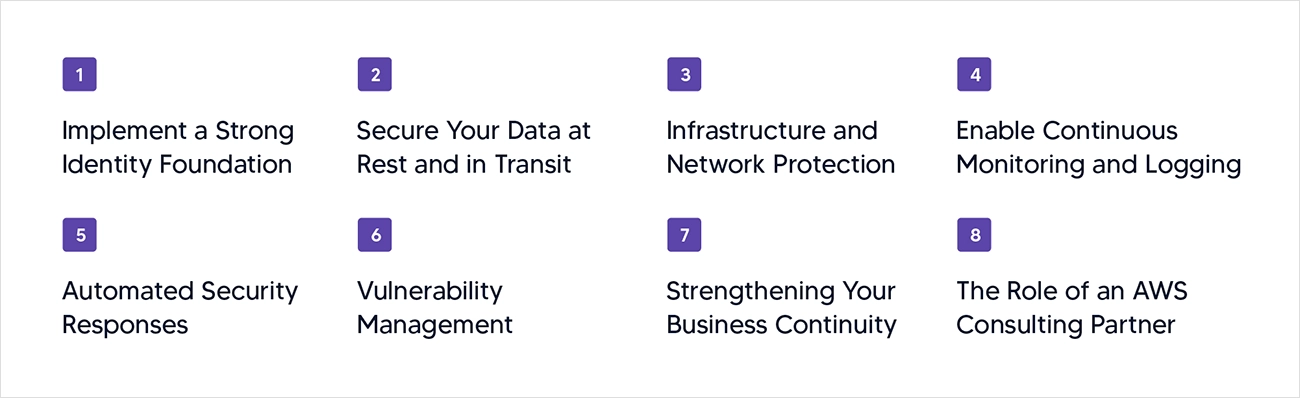
1. Implement a Strong Identity Foundation
Identity and Access Management (IAM) serves as the primary perimeter of the modern cloud, shifting the focus from physical "walls and moats" to verified identities. To master AWS security, you must adhere to the principle of least privilege (POLP), ensuring that no user or service has more permissions than necessary for its specific task. This is critical because more than 70% of companies have IAM roles with overly permissive "Admin" privileges, creating a massive attack surface. Furthermore, implementing multi-factor authentication(MFA) across all accounts, especially those with administrative access, is the single most important way to prevent unauthorized entry. By avoiding the use of the “Root” account for daily operations and using IAM roles instead of long-term credentials, you create an audited and resilient identity layer.
Identity and Access Management (IAM) serves as the primary perimeter of the modern cloud, shifting the focus from physical "walls and moats" to verified identities. To master AWS security, you must adhere to the principle of least privilege (POLP), ensuring that no user or service has more permissions than necessary for its specific task. This is critical because more than 70% of companies have IAM roles with overly permissive "Admin" privileges, creating a massive attack surface. Furthermore, implementing multi-factor authentication(MFA) across all accounts, especially those with administrative access, is the single most important way to prevent unauthorized entry. By avoiding the use of the “Root” account for daily operations and using IAM roles instead of long-term credentials, you create an audited and resilient identity layer.
2. Secure Your Data at Rest and in Transit
Protecting data is the ultimate goal of AWS cloud security, requiring a multi-layered encryption strategy. You should leverage the AWS key management service (KMS) to manage cryptographic keys and ensure that every day repository, including S3 buckets, EBS volumes, and RDS databases, is encrypted at rest. The stakes are high; recent studies found that unprotected data in S3 buckets accounted for 16% of all cloud data breaches in recent years. Similarly, data in transit must be protected using TLS ( transport layer security) for all movements between users and the cloud, or between internal services. Using AWS Certification Manager ( ACM ) to automate SSL / TLS certificate renewals ensures that your data remains encrypted and your connections stay trusted without manual intervention.
3. Infrastructure and Network Protection
Your network configuration determines the pathways through which traffic enters and exits your environment. To secure this, you must isolate resources within a Virtual Private Cloud (VPC) and use a combination of Security Groups and Network Access Control Lists (NACLs) to act as virtual firewalls. A key AWS security best practice is to never open management ports, SSH(22) or RDP(3389) to the entire internet; instead, use secure access methods like AWS Systems Manager Session Manager. Beyond the VPC, you should deploy AWS WAF (Web Application Firewall) to filter out malicious web traffic and AWS Shield to mitigate DDOS attacks, ensuring that your applications remain available and performant even under external pressure.
4. Enable Continuous Monitoring and Logging
Visibility is the cornerstone of defense, as you cannot secure what you cannot see. You must enable AWS Cloud Trail across all regions to maintain a comprehensive audit trail of every API call made within your account, answering the vital questions of who did what and when. To complement this, Amazon GuardDuty provides intelligent threat detection by continuously monitoring your logs for malicious activity or unauthorized behavior using machine learning. Statistics show that companies utilizing automated security analytics like GuardDuty can reduce their mean time to detect (MTTD) breaches by up to 50%. By integrating these logs into a central dashboard, you gain the situational awareness needed to catch intruders before they can cause damage.
5. Automated Security Responses
In the fast-paced world of the cloud, manual security interventions are often too slow to combat automated threats. By adopting Infrastructure as Code (IaC) via tools like AWS CloudFormation or Terraform, you can ensure that security configurations, such as encrypted buckets and restricted firewall rules, are consistently applied and cannot be easily bypassed. Furthermore, implementing automated remediation through AWS Config and AWS Lambda allows your environment to self-heal; for example, if an S3 bucket is accidentally made public, a Lambda function can instantly revert it to private. Automation removes the element of human error, which Gartner predicts will be the cause of 99% of cloud failures. By leveraging professional DevOps consulting services, organizations can seamlessly integrate security checks into their CI/CD pipelines, ensuring that your security posture remains constant even as your infrastructure scales.
6. Vulnerability Management
Think of vulnerability management as a regular health check-up for your cloud environment. Even the best security settings won't help you if the software running inside your cloud has weak spots that hackers can exploit. Instead of manually checking every server, you can use automated tools like Amazon Inspector that act as a digital security guard, constantly scanning your systems for known weaknesses. This ensures that your business stays ahead of potential threats without needing a massive team of technical experts to do the heavy lifting. By catching these gaps early, you protect your brand’s reputation and ensure that your customer data stays behind locked doors.
7. Strengthening Your Business Continuity
No security plan is complete without a safety net. True operational resilience comes from a robust backup and recovery strategy. This means using automated services like AWS backup to regularly create copies of your mission-critical data and storing them in isolated locations. By having a "plan B," you ensure that even in the event of a cyber-attack or accidental deletion, your business can get back on its feet in hours rather than weeks. This proactive approach to AWS security best practices doesn’t just protect your data; it protects the bottom line and maintains the trust your customers place in your brand.
8. The Role of an AWS Consulting Partner:
Navigating the hundreds of specialized services within the AWS ecosystem requires a level of expertise that many organizations find difficult to maintain in-house. This Cloud Skills gap is why many successful enterprises engage with an AWS consulting partner to manage their security strategy. These partners provide expert, well-architected reviews to identify hidden risks, help map technical controls to regulatory standards like HIPAA or PCI-DSS, and often provide 24/7 managed security services. By leveraging their specialized knowledge, you can ensure that your AWS security best practices are not just a checklist, but a robust, evolving strategy that supports your business growth without compromising on safety.
Conclusion
Securing an AWS environment is not a one-time project; it is a continuous journey of improvement. By implementing these AWS security best practices, from enforcing MFA and the principle of least privilege to automating threat detection, you can significantly reduce your risk profile. The cloud offers unprecedented agility, but that agility must be tempered with vigilance. Ultimately, achieving a "security-first" culture requires more than just the right tools; it requires a strategic vision that balances innovation with uncompromising safety. In an era where cyber threats evolve daily, staying ahead means moving from reactive to proactive governance. This is where the expertise of a specialized AWS consulting partner like Kellton becomes a game-changer. Kellton’s deep technical proficiency across different layers of cybersecurity ensures that your cloud journey isn't just fast, but fundamentally secure. By combining Kellton’s hands-on experience in DevSecOps and automated governance with the power of AWS, you can unlock infinite possibilities while keeping your digital assets under lock and key.
Frequently Asked Questions(FAQs)
Q1. How does AWS security impact my company's bottom line?
Ans. Strong security prevents multi-million dollar data breaches and protects your brand reputation, ensuring that customer trust and your revenue streams remain uninterrupted. It also automates compliance, saving your team hundreds of hours on manual audits and reducing the risk of heavy regulatory fines.
Q2. Is moving to AWS safer than keeping my data in a local office server?
Ans. Yes, because AWS invests billions in physical and digital security that most individual companies cannot match, offering military-grade protection by default. While you are responsible for how you use the cloud, AWS handles the complex "behind-the-scenes" security that keeps the global infrastructure running.
Q3. What is the business risk of ignoring the Shared Responsibility Model?
Ans. If leadership assumes AWS handles everything, critical gaps like employee access levels or data backups might be left open, leading to 99% of cloud failures. Understanding this model ensures your team knows exactly where to focus their efforts to keep your specific business data locked down.
Q4. How does a security-first approach help us scale faster?
Ans. By building security into your foundation now, you avoid costly re-work later and can launch new products with confidence knowing your infrastructure is resilient. It turns security from a bottleneck into a competitive advantage that proves to your enterprise clients that their data is safe with you.
Q5. Why should a business leader care about least privilege access?
Ans. It’s a simple risk-reduction strategy: by ensuring employees only have access to the tools they need for their specific job, you stop a small human error from becoming a company-wide crisis. It’s the digital equivalent of not giving every employee a master key to the entire building.