Other recent blogs


Angular 21 marks a decisive moment in the framework’s evolution. This release is not about adding another layer of abstractions or incremental syntactic sugar—it is about simplifying Angular’s mental model while dramatically improving performance, predictability, and developer experience.
With Angular 21, the framework fully embraces a signal-first, zoneless, modern tooling architecture. Long-standing challenges around change detection overhead, testing speed, form complexity, and accessibility are addressed at a foundational level. For enterprises building large-scale, mission-critical applications, Angular 21 offers a cleaner, faster, and more future-proof platform.
This blog explores every major update in Angular 21, explains how it differs from previous versions, outlines tangible business benefits, and provides a step-by-step migration roadmap to help teams adopt Angular 21 with confidence.
What makes Angular 21 different from previous Angular versions?
Angular has evolved significantly since its 2016 rewrite from AngularJS development standards. The framework moved from NgModules to standalone components (Angular 14-15), introduced Signals for reactive state management (Angular 16), and stabilized the new control flow syntax (Angular 17). Each version refined developer experience while maintaining backward compatibility.
Angular 21 represents a consolidation point. The framework removes zone.js as a default dependency, a library that has powered Angular's change detection since version 2. This decision follows Google's internal usage data showing over half of new Angular applications built in 2024 used zoneless architecture, with hundreds of zoneless applications running in production.
The version history shows clear progression: Angular 9 introduced the Ivy compiler, Angular 12 deprecated View Engine, Angular 15 made standalone components production-ready, and Angular 19-20 stabilized zoneless support. Angular 21 makes these improvements the default path forward. New projects start with zoneless change detection, HttpClient automatically included, and Vitest as the test runner.
Angular 21 shifts the framework:
- From implicit to explicit change detection
- From RxJS-heavy state patterns to signal-driven reactivity
- From slow, legacy testing pipelines to modern, Vite-powered workflows
- From accessibility as an afterthought to accessibility by design
The result is an Angular version that feels lighter and more predictable, especially when paired with the best practices found in our guide to automated testing and QA.
What is new in Angular 21 version?
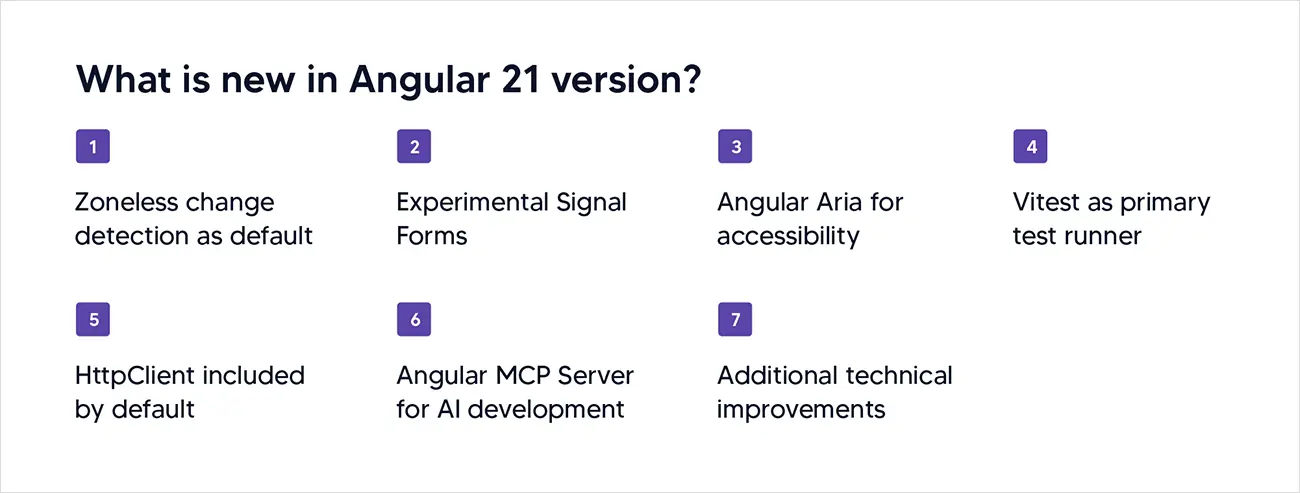
1. Zoneless change detection as default
Angular 21 removes zone.js from new project scaffolding. Zone.js patches browser APIs to intercept asynchronous operations, allowing Angular to detect when to update the UI. This approach worked but created problems: debugging became harder because stack traces passed through zone.js, bundle sizes increased by approximately 30KB, and integration with non-Angular libraries required workarounds.
The zoneless architecture relies on Signals and explicit change detection triggers. When state changes through a Signal, Angular knows exactly which components need updates. No global patching required. Applications using native async/await, requestAnimationFrame, or third-party libraries like D3.js work without zone.js interference.
For existing applications, migration is optional but recommended. Angular 21 includes schematics to help convert applications to OnPush change detection strategy, a prerequisite for zoneless migration. The MCP Server's onpush_zoneless_migration tool analyzes your codebase and provides a step-by-step migration plan.
2. Experimental Signal Forms
Angular 21 introduces Signal Forms, an experimental forms API built entirely on Signals. Traditional reactive forms use observables, requiring RxJS knowledge and subscriptions management. Signal Forms provide type-safe, reactive form handling without observable complexity.
The API uses form() and field() functions instead of FormGroup and FormControl classes. Form values become signals you can read directly or use in computed values. Validation errors, touched state, and form validity all expose as signals.
typescript
import { form, field } from '@angular/forms/signals';
const loginForm = form({
email: field('', [Validators.required, Validators.email]),
password: field('', [Validators.required, Validators.minLength(8)])
});
// Access as signal
console.log(loginForm.value().email);
console.log(loginForm.valid());
This API remains experimental. Production applications should continue using existing reactive forms until Signal Forms reach stability, expected in Angular 22 or 23.
3. Angular Aria for accessibility
Angular Aria launches in developer preview, providing headless UI components with built-in accessibility features. The library handles ARIA attributes, keyboard navigation, focus management, and screen reader compatibility automatically.
Unlike Angular Material, which provides styled components, Angular Aria gives you accessible behavior without visual opinions. You control CSS entirely. This matters for teams with custom design systems who need accessibility compliance without fighting component styling.
The library addresses EU accessibility requirements becoming mandatory in 2025, making compliance simpler for enterprise applications.
4. Vitest as primary test runner
Angular 21 deprecates Karma and adopts Vitest as the default testing framework. Karma served Angular well but showed age: slow test execution, complex configuration, and dependence on browser automation that Vitest avoids.
Vitest runs tests in Vite's development server, providing instant feedback through hot module replacement. Test files execute faster, configuration is minimal, and the developer experience improves significantly. The framework supports ESM natively, handles TypeScript without additional setup, and integrates with modern tooling.
For existing projects using Karma, Angular provides an experimental migration schematic:
bash
ng generate @angular/core:karma-to-vitest
The migration converts karma.conf.js to vitest.config.ts and updates test files. Custom Karma plugins require manual migration.
5. HttpClient included by default
Previous Angular versions required importing HttpClientModule or calling provideHttpClient() in application config. Angular 21 includes HttpClient in the root injector automatically. You can inject HttpClient in any service or component without additional setup.
This change removes boilerplate and aligns with Angular's move toward simplicity. The automatic inclusion adds negligible bundle size for applications already using HTTP features.
6. Angular MCP Server for AI development
Angular 21 ships with an MCP (Model Context Protocol) Server that allows AI tools to understand Angular project structure and best practices. The server provides seven tools covering documentation search, code examples, project discovery, and migration planning.
Integration with AI assistants (compatible with Azure OpenAI service, Anthropic's Claude, OpenAI's ChatGPT, and similar platforms) means you can ask questions like "migrate this component to standalone" or "find Signal Forms examples" and receive context-aware responses based on official Angular documentation and patterns.
The MCP Server includes tools for:
- Searching Angular documentation
- Finding code examples with modern patterns
- Discovering Angular projects in your workspace
- Planning zoneless migration
- Running automated code migrations
- Launching an interactive Angular tutor
This represents Angular's first significant integration with AI-assisted development workflows.
7. Additional technical improvements
Angular 21 includes several smaller enhancements that improve daily development:
Typed SimpleChanges: The SimpleChanges interface becomes generic, allowing type-safe access to previous and current values in ngOnChanges lifecycle hooks.
NgClass and NgStyle migrations: Automated schematics convert NgClass and NgStyle directives to class and style bindings, reducing bundle size and improving template readability.
Documentation refresh: Angular.dev received updated documentation focusing on modern patterns, zoneless architecture, and Signal-based development.
Router and Material updates: RouterTestingModule deprecates in favor of RouterModule with provideLocationMocks(). Angular Material and CDK receive zoneless compatibility improvements.
What are the key benefits of using Angular 21 for Angular development?
1. Performance improvements without code changes
Zoneless architecture reduces bundle size by approximately 30KB (zone.js removal) and improves runtime performance. Applications see better Core Web Vitals scores, particularly in Interaction to Next Paint (INP) metrics. The framework processes fewer events and executes change detection more efficiently.
For applications with complex forms or heavy user interaction, performance gains become measurable.While the framework provides these out-of-the-box, you can further enhance speed by following these tips to optimize performance in an Angular application. Google's internal benchmarks show zoneless applications rendering faster and consuming less memory under load.
2. Simplified debugging and development
Zone.js created debugging challenges by modifying stack traces and intercepting asynchronous operations. Developers often encountered errors where the stack trace pointed to zone.js internals rather than application code.
Zoneless architecture eliminates these issues. Stack traces reflect actual code execution paths. Browser DevTools work as expected. Third-party libraries integrate without zone.js compatibility checks.
3. Better ecosystem compatibility
Libraries not designed for Angular's zone-based change detection often required workarounds. Direct DOM manipulation, canvas libraries, and WebGL frameworks could trigger excessive change detection or fail to update Angular components properly.
Zoneless Angular integrates naturally with any JavaScript library. You can use D3.js for visualizations, Three.js for 3D graphics, or any npm package without considering zone.js compatibility.
4. Type-safe forms with less complexity
Signal Forms reduce the learning curve for Angular forms. New developers can work with form state using signals instead of learning observables, subscriptions, and RxJS operators. Experienced developers benefit from better type inference and less boilerplate.
The API makes form composition simpler. Nested forms, dynamic form arrays, and custom form controls become more intuitive to build and maintain.
5. Accessibility built-in
Angular Aria removes the burden of implementing keyboard navigation, ARIA attributes, and screen reader support manually. The library handles accessibility requirements automatically while letting you control visual design completely.
For enterprise applications facing EU accessibility mandates, this reduces compliance risk and development time.
What are the key challenges and considerations in Angular 21 development?
1. Zoneless migration complexity
Existing applications built with zone.js assumptions require careful migration. Components using ChangeDetectorRef.detectChanges(), NgZone.run(), or relying on automatic change detection after setTimeout/setInterval calls need updates.
Applications must ah3dopt OnPush change detection strategy before going zoneless. This requires auditing components for proper change detection triggers and ensuring state changes use signals or other explicit mechanisms.
Large codebases may contain patterns incompatible with zoneless architecture. Manual testing is required after migration to catch runtime issues that automated schematics miss.
2. Signal Forms experimental status
Signal Forms remain experimental in Angular 21. The API may change before stability. Production applications should delay adoption until the feature reaches stable status, likely in Angular 22 or 23.
Teams adopting experimental APIs accept the risk of breaking changes in minor version updates. This is acceptable for new features or non-critical forms but risky for core business functionality.
3. Testing migration effort
Moving from Karma to Vitest requires test file changes beyond what automated schematics handle. Custom test utilities, mocks, or browser-specific test scenarios may need rewriting.
Applications with extensive test suites should allocate time for migration testing. While Vitest improves developer experience, the migration itself represents work with no immediate feature value.
4. Third-party library compatibility
Not all Angular libraries support zoneless architecture yet. Angular Material and CDK provide zoneless support in Angular 21, but community libraries may lag behind.
Before migrating production applications, verify that critical dependencies support zoneless change detection. Contact library maintainers if compatibility information is unclear.
How to upgrade to Angular 21: A migration step-by-step guide for Angular 21 implementation
Pre-migration checklist
Before upgrading, ensure your application meets these requirements:
- Git cleanliness: Commit all changes. Run upgrades with a clean working tree to isolate upgrade-related changes from your work.
- Node.js version: Verify you're running Node.js 18.19 or later. Check with node -v.
- Dependency audit: Review package.json for deprecated packages. Address critical dependency warnings before upgrading Angular.
- Test suite status: Ensure tests pass on current version. Failing tests complicate identifying upgrade-related issues.
- Team communication: Notify team members about the upgrade. Coordinate to avoid merge conflicts during migration.
- Backup branch: Create a backup branch or tag current state for rollback if needed.
Core upgrade steps
Step 1: Update Angular core packages
Run the Angular CLI update command:
bash
ng update @angular/core@21 @angular/cli@21
This command updates framework packages and runs automated migrations. Watch console output carefully. The CLI reports which migrations execute and any manual steps required.
Step 2: Update Angular Material and CDK
If using Angular Material, update it separately:
bash
ng update @angular/material@21
Step 3: Update third-party dependencies
Update other Angular ecosystem packages:
bash
ng update @angular/cdk@21
ng update @angular/platform-server@21
For non-Angular dependencies showing peer dependency warnings, update them individually:
bash
npm install rxjs@latest
npm install zone.js@latest
Step 4: Run available migrations
Angular 21 provides several optional migrations:
Convert to Signal inputs:
bash
ng generate @angular/core:signal-input-migration
Convert to Signal queries:
bash
ng generate @angular/core:signal-queries-migration
Migrate NgClass to class bindings:
bash
ng generate @angular/core:class-binding
Migrate NgStyle to style bindings:
bash
ng generate @angular/core:style-binding
Migrate from Karma to Vitest (experimental):
bash
ng generate @angular/core:karma-to-vitest
Step 5: Test thoroughly
After migration:
Run full test suite: ng test
Run application locally: ng serve
Test all critical user workflows manually
Check browser console for warnings or errors
Verify production build: ng build --configuration production
Post-migration checklist
After successful upgrade:
- Review migration reports: Check migration output files for any manual steps required.
- Update documentation: Document any breaking changes affecting team workflows.
- Monitor performance: Compare bundle sizes and runtime performance with previous version.
- Plan zoneless migration: If staying with zone.js for now, create a plan for eventual zoneless migration.
- Update CI/CD: Verify build pipelines work with Angular 21. Update Docker images or deployment scripts if needed.
- Team training: Share new features like Signal Forms or Angular Aria with developers.
Zoneless-specific migration path
For teams ready to adopt zoneless:
Phase 1: Enable OnPush everywhere
Convert all components to OnPush change detection strategy:
bash
ng generate @angular/core:onpush-migration
Review each component manually. OnPush requires components to trigger change detection explicitly when state changes.
Phase 2: Remove zone.js dependencies
Remove zone.js from package.json:
bash
npm uninstall zone.js
Remove zone.js import from polyfills.ts or main.ts.
Phase 3: Enable zoneless in application config
Update application bootstrap:
typescript
bootstrapApplication(AppComponent, {
providers: [
provideExperimentalZonelessChangeDetection()
]
});
Phase 4: Address runtime issues
Test application thoroughly. Common issues include:
Components not updating after async operations
Third-party library integration problems
Custom change detection logic failing
Fix issues by ensuring state changes use signals or calling ChangeDetectorRef.markForCheck() explicitly.
Kellton capabilities in Angular 21 migration
Kellton helps enterprises navigate Angular 21 migration through technical assessment, automated migration, and performance optimization. Our team evaluates codebases for zoneless readiness, executes migrations with minimal disruption, and provides training on Signal Forms, Angular Aria, and new testing approaches. We ensure applications leverage Angular 21's performance improvements while maintaining stability. Contact our Angular specialists to discuss your migration requirements.
Frequently asked questions(FAQ)
Q1. What is new in Angular 21?
Angular 21 removes zone.js as the default dependency, introduces experimental Signal Forms, adds Angular Aria for accessibility, adopts Vitest as the primary test runner, includes HttpClient by default, and provides MCP Server for AI-assisted development.
Q2. What is the difference between Angular 21 and Angular 20?
Angular 20 stabilized zoneless support, while Angular 21 makes it the default for new projects. Angular 21 adds Signal Forms, Angular Aria, Vitest as default test runner, and MCP Server integration. Bundle sizes decrease through zone.js removal.
Q3. What are the features of Angular 21?
Key features include zoneless change detection by default, an experimental Signal Forms API, the Angular Aria accessibility library, the Vitest test runner, automatic HttpClient inclusion, and MCP Server for AI development tools. Benefits are smaller bundles, better performance, easier debugging, and improved ecosystem compatibility.
Q4. Should you switch to Angular 21 development?
New projects should start with Angular 21 to benefit from reduced bundle size, better performance, and modern defaults. Existing applications should upgrade when teams can allocate time for testing and potential zoneless migration planning. Critical production applications should wait for patch releases addressing early bugs.