Other recent blogs


In 2026, the best React Native UI library depends on your architectural needs. Choose Tamagui for maximum performance with an optimizing compiler, NativeWind for Tailwind-style rapid development, or Gluestack-UI for modular, enterprise-grade components with full New Architecture support. Below, we rank and benchmark all 15 – with GitHub stars, npm downloads, and real trade-offs – so you can pick the right one for your project.
The hybrid mobile app development landscape has undergone a major transformation in recent years due to the wide adoption of component-based architecture, cross-platform development, and modern front-end technologies. In response, most companies now rely on native and open-source UI frameworks as foundational building blocks to create rich, secure, modular, easy-to-maintain, and fully native mobile apps for iOS and Android.
One popular choice in this ecosystem is React Native (RN). Developed by Meta, this JavaScript library lets developers build best-in-class user interfaces faster than starting from scratch. React Native is poised to be the next mobility disruption, letting teams make essential customizations to existing Android and iOS projects without maintaining two separate codebases.
Fortune 500 companies – Microsoft, Shopify, Puma, Walmart, Tesla, and Flipkart among them – already lean on React Native to turn JavaScript components into native ones. But what’s the real driver behind this? Let’s find out why companies across industries are choosing React Native for cross-platform development, and then dig into the 15 UI libraries that make that development faster.
React Native – the one framework to rule them all
React Native is a JavaScript framework that combines the best of both worlds: the performance of native development and the flexibility of web development. This mix ensures a seamless development lifecycle from the comfort of the JavaScript library and React Native UI libraries, with zero compromise on user experience across devices.
React Native remains the go-to choice for global companies in 2026 because it lets developers use fundamental UI building blocks the same way regular iOS and Android apps do. This cross-platform framework lets mobile app developers write one codebase for both iOS and Android, eliminating the need to write and maintain separate code for each platform.
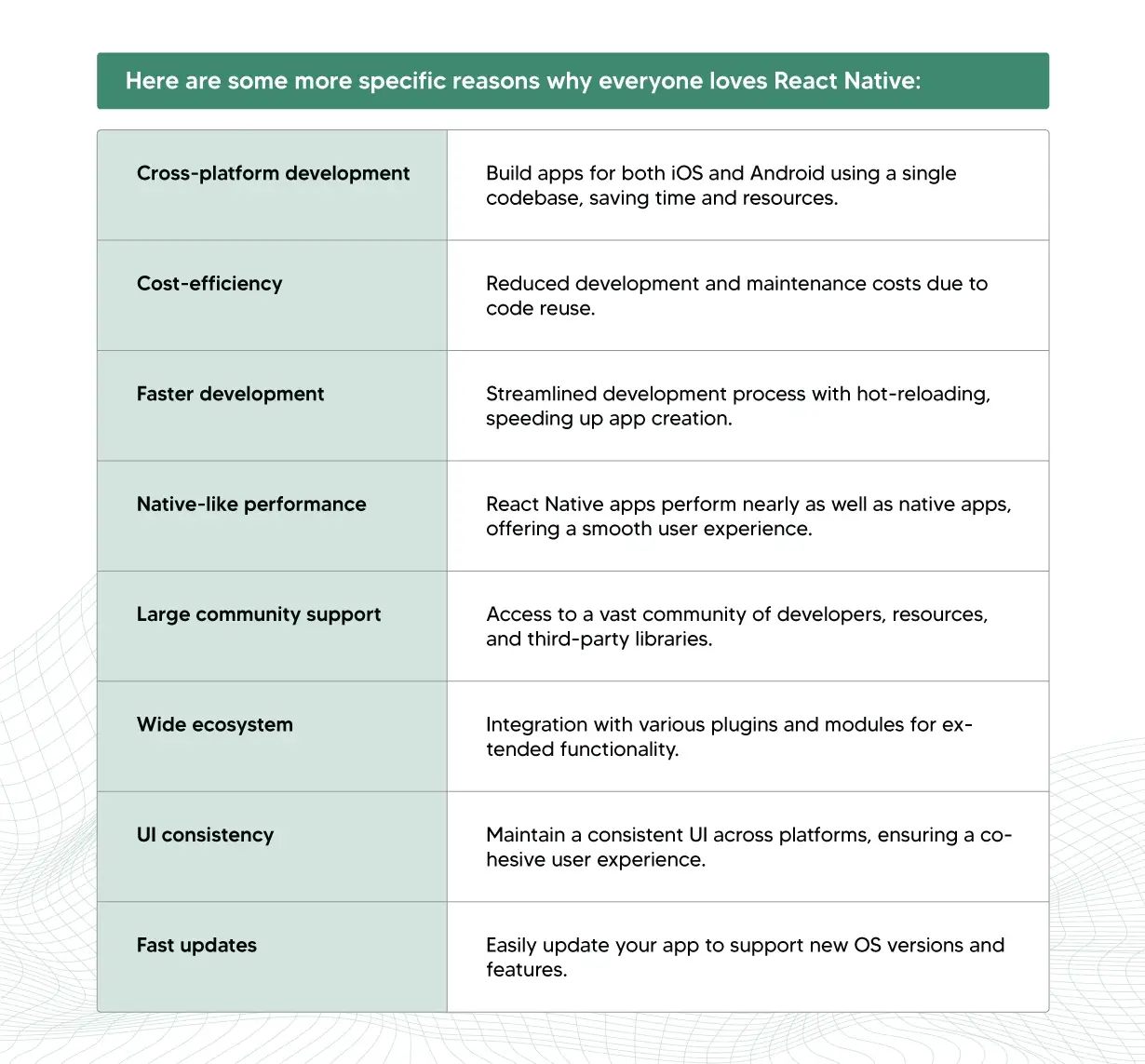
No wonder companies from Fortune 500s to unicorn startups swear by React Native to create excellent experiences for web and native user interfaces. It provides a strong foundation for cross-platform mobile app development – but pre-built React Native UI components and libraries are what take that development to the next level, creating polished user experiences faster with minimal downtime.
Do you need a component library for React Native?
The rising trend of React Native has driven soaring demand for React Native UI libraries and components – some of the most essential tools in the ecosystem. They optimize the development process by giving developers pre-designed, customizable UI components, streamlining the otherwise complex process of building visually appealing, feature-rich, user-friendly interfaces.
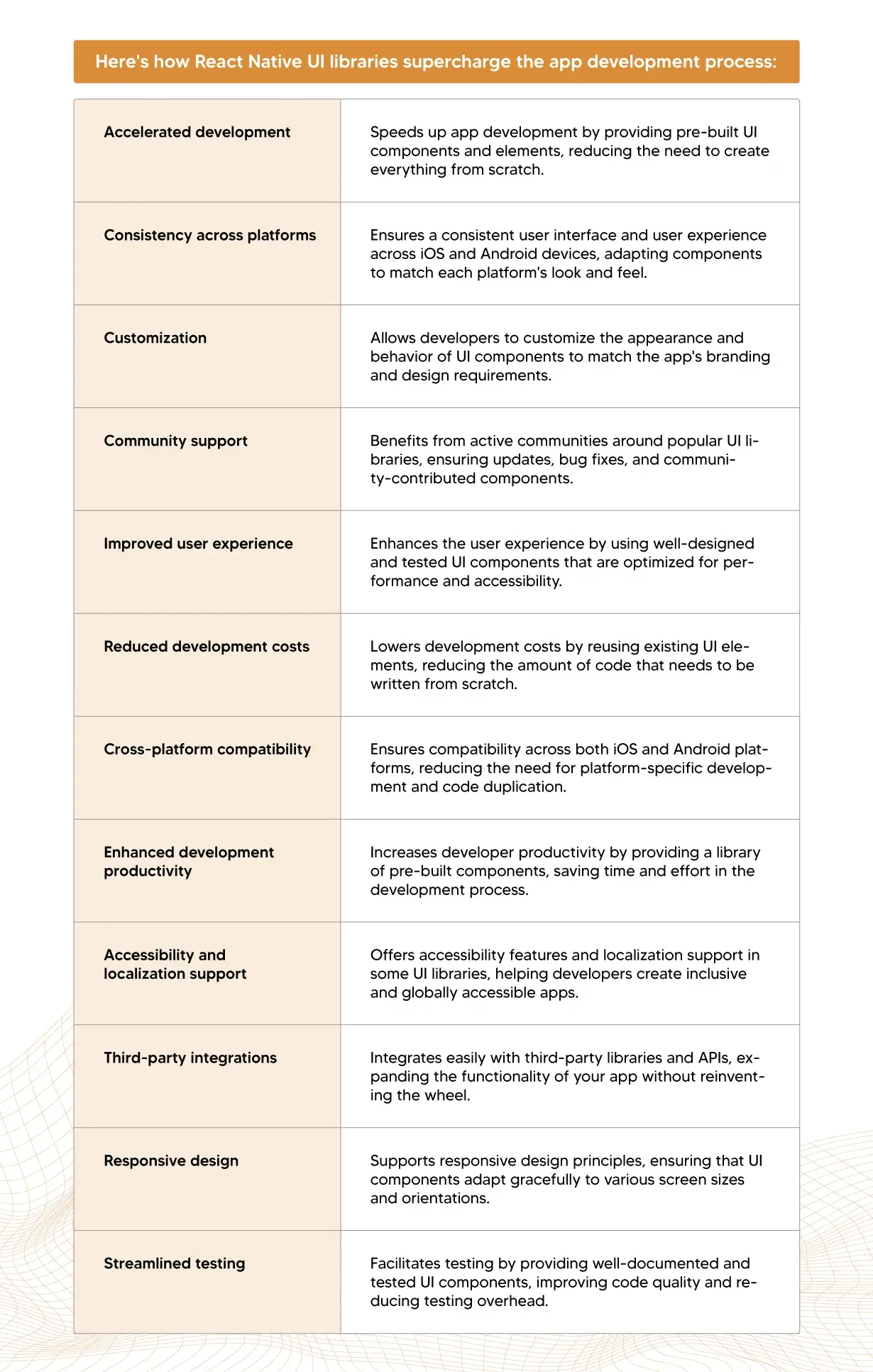
In 2026, React Native continues to be a powerhouse for cross-platform mobile app development, and it has matured further with numerous high-quality UI libraries that let developers create a native-like experience. These libraries have earned attention from cross-platform developers worldwide for their features, performance, and ease of use. Let’s dive into the 15 best React Native UI libraries dominating mobile app development in 2026.
2026 comparison: architecture, performance & best use case
| Library | Primary Focus | Architecture / Performance | Best Use Case |
|---|---|---|---|
| Gluestack-UI | Universal & modular | Full Fabric & TurboModules | Enterprise systems without vendor lock-in |
| NativeWind | Tailwind CSS utility | Zero-runtime; build-time CSS | Teams sharing styling logic across platforms |
| Tamagui | Performance & speed | Optimizing compiler; JSI | High-performance, consumer-facing apps |
| RN Reusables | Copy-paste components | Owned code (built on NativeWind) | Teams wanting a “shadcn” experience |
| RN Paper | Material Design | Material 3.0 compliance | Cohesive, Google-style modern accessibility |
| RN Elements (RNEUI) | Simplicity & utility | Cross-platform consistent | General-purpose apps and MVPs |
| UI Kitten | Theming & visuals | Theme-based custom engine | Projects needing bespoke, on-brand visuals |
| Ant Design Mobile RN | Corporate consistency | Ant Design system principles | Polished, internationalized enterprise apps |
| Victory Native | Data visualization | Interactive charting components | Dashboards and reporting tools |
| Wix RNUI | Battle-tested breadth | 60+ components; New Architecture ready | Large-scale apps with complex layout needs |
| Ignite | Boilerplate | Pre-configured best practices | Kick-starting scalable new projects |
| Dripsy | Responsive design | Array-based theme hooks | Universal apps (Expo + Next.js) |
| Lottie | Advanced animation | After Effects real-time rendering | Lightweight, high-fidelity vector animations |
| RN Vector Icons | Iconography | TurboModule & font-based | Scalable icons for every project |
| Shopify Restyle | Type-safe theming | Lightweight runtime theming | Design systems needing strict type safety |
Top 15 React Native UI libraries in 2026
1. Gluestack-UI (the successor to NativeBase)
If you were a fan of NativeBase, Gluestack-UI is your new home. In 2026, it has solidified itself as the premier “universal” component library. Unlike its predecessor, Gluestack-UI v5 uses a “source-to-destination” architecture, meaning you only import what you use, keeping your bundle size incredibly light.
Key advantage: Built from the ground up to be “unbundled.” You can copy-paste components directly into your project, giving you 100% control over the source code.
Architecture support: Full Fabric and TurboModules compatibility.
Community signal: ~5,200 GitHub stars on the core repo. As a copy-paste library it doesn’t carry a single npm download number the way traditional packages do – usage is better tracked through its CLI installs and Discord community.
Best for: Enterprise-scale applications requiring a custom design system without the “vendor lock-in” of traditional libraries.
In our own testing across React Native migrations to the New Architecture, Gluestack’s modular imports have been one of the more reliable ways we’ve cut unused component weight from client bundles – worth validating against your own bundle analyzer before committing, but it’s consistently been a fast path to a lighter app.
2. NativeWind (Tailwind CSS for React Native)
NativeWind has become the industry standard for styling in 2026. It brings the power of Tailwind CSS to mobile with a “zero-runtime” approach. By compiling styles at build time into native StyleSheet.create objects, it keeps your UI snappy even on low-end Android devices.
Key advantage: Uses the same classes you know from web development (e.g., className="flex-1 bg-blue-500"), making it the ultimate tool for full-stack developers.
2026 update: Version 4.x adds support for Container Queries and improved CSS variable performance.
Best for: Teams that want to share styling logic between a React web app and a React Native mobile app.
3. Tamagui (the performance powerhouse)
For apps where every millisecond of rendering time counts, Tamagui is the undisputed leader. It features a sophisticated optimizing compiler that analyzes your styles and “flattens” them into the most efficient native code possible.
Key advantage: “Type-safe” styling with zero performance overhead at runtime. Its “Adapt” primitive lets your UI automatically change layout based on platform or screen size.
Architecture support: Deep integration with the JSI (JavaScript Interface) for near-native communication speeds.
Trade-off worth knowing: the compiler setup takes longer to configure than Gluestack or NativeWind – budget extra ramp-up time for teams new to it.
Best for: High-performance consumer apps and complex dashboards with heavy data visualization.
4. React Native Reusables (the “shadcn” of mobile)
Inspired by the massive success of shadcn/ui on the web, React Native Reusables provides a collection of beautifully crafted components built on top of NativeWind and Radix Primitives. It’s not a library you install – it’s a collection of components you own.
Key advantage: Total design freedom. Since you copy the code into your components/ui folder, you never wait for a library update to fix a bug or change a style.
Key components: High-quality implementations of tricky mobile elements like Sheet (bottom sheets), Combobox, and Progress.
Best for: Developers who want a premium, modern “look” immediately without building from scratch.
5. React Native Paper
React Native Paper is one of the most mature, widely adopted libraries in the ecosystem, and it’s the go-to for teams that want Google’s Material Design out of the box without reinventing it component by component.
Key advantage: Full Material Design 3 (Material You) compliance, meaning your app automatically inherits modern, accessible defaults – proper touch targets, elevation, ripple effects, and dark-theme support – without custom work.
Architecture support: Actively maintained for the New Architecture; the library averages roughly one release update per month, so security and RN-version compatibility rarely lag.
Community signal: ~14,400 GitHub stars, ~400K+ weekly npm downloads – among the highest download counts of any RN-specific UI library.
import { Button, Card, Text } from 'react-native-paper'; export default function ProfileCard() { return ( <Card> <Card.Content> <Text variant="titleLarge">Material 3, out of the box</Text> </Card.Content> <Card.Actions> <Button mode="contained">Get Started</Button> </Card.Actions> </Card> ); }
Best for: Apps that need a cohesive, accessible, Google-style design without a heavy customization layer.
Avoid if: your brand guidelines require a look far removed from Material Design – theming it away from Material’s visual language takes more effort than starting from a headless library like Gluestack.
6. React Native Elements (RNEUI)
React Native Elements – now published as @rneui/base and @rneui/themed – offers cross-platform components with a focus on simplicity and consistency: buttons, icons, overlays, typography, and more.
Key advantage: Doesn’t enforce a specific design language the way Material or Ant Design do, so it’s easier to reskin for a custom brand.
>
Best for: General-purpose apps and MVPs that need a wide component spread without committing to a heavy design system.
Avoid if: you need tree-shaking discipline out of the box – older versions ship components you may not use, so check bundle impact with an analyzer.
7. UI Kitten
UI Kitten pairs a component library with the Eva Design System, giving you a powerful theming engine for building unique, on-brand visual identities without hand-rolling a design system.
Key advantage: Swap entire visual themes (including dark mode) by changing a single config file – no per-component restyling needed.
Honest note: maintenance activity has slowed compared to 2023–2024; some teams have migrated off it toward Gluestack or Tamagui for that reason. Worth checking the repo’s recent commit history before committing to it for a new project.
Best for: Projects that need a highly customizable, bespoke visual identity and don’t need bleeding-edge New Architecture optimizations.
8. Ant Design Mobile RN
Ant Design Mobile RN is the React Native implementation of the popular Ant Design system, giving you the same polished, internationalized component language used across countless enterprise web apps.
Key advantage: If your organization already uses Ant Design on the web (dashboards, admin panels), this gives you visual and behavioral consistency across your web and mobile products with minimal design-system duplication work.
Best for: Enterprise apps – especially those already inside an Ant Design ecosystem – that need a polished, consistent design language across platforms.
Avoid if: you’re starting from scratch with no existing Ant Design usage; the design language is opinionated and harder to bend toward a custom brand than utility-first options like NativeWind.
9. Victory Native
Victory Native, maintained by Formidable, is the go-to charting library when your app’s UI needs to show data, not just collect it – dashboards, analytics screens, fitness trackers, and financial apps.
Key advantage: Shares its API almost identically with the web version of Victory, so teams building both a web dashboard and a mobile app can reuse chart logic and mental models across both.
Community signal: Actively maintained by Formidable, with hundreds of thousands of weekly npm downloads across its packages.
import { CartesianChart, Line } from 'victory-native'; export default function RevenueChart({ data }) { return ( <CartesianChart data={data} xKey="month" yKeys={['revenue']}> {({ points }) => <Line points={points.revenue} color="teal" strokeWidth={3} />} </CartesianChart> ); }
Best for: Engaging, interactive dashboards and reporting tools inside your app.
10. Wix React Native UI Lib (RNUI)
If you need a massive, battle-tested library that covers almost every imaginable UI scenario, RNUI by Wix is the answer. It features 60+ high-quality components, from basic buttons to advanced carousels and floating action buttons.
Key advantage: A specialized “Incubator” section where Wix tests next-generation components (like Toast and PanResponder views) before they become standard – you get an early look at what’s coming.
2026 status: Provides an automated migration script for teams moving from v7 to v8, with enhanced support for React 19 concurrent rendering.
Best for: Large-scale apps with complex layout needs that benefit from a single, comprehensive component source instead of stitching together several smaller libraries.
11. Ignite
Ignite, maintained by Infinite Red, isn’t a component library in the traditional sense – it’s a React Native boilerplate that ships with pre-configured tooling, state management, testing, and project structure already wired up and following current best practices.
Key advantage: Saves the days typically spent on project setup (navigation, state, testing scaffolding, environment config) so your team can start on features on day one instead of infrastructure.
Best for: Kick-starting new, scalable projects – especially for teams that want an opinionated, battle-tested starting structure rather than assembling one from scratch.
Avoid if: you’re adding UI to an existing, mature codebase – Ignite is designed for greenfield projects, not retrofits.
12. Dripsy
Dripsy solves one of React Native’s most persistent headaches: making a single app look right on both a 6-inch phone and a 27-inch desktop monitor. It uses a “theme-first” approach similar to Theme UI on the web.
Key advantage: Its sx prop accepts arrays for values (e.g., width: [100, 200, 400]), automatically scaling the UI based on device breakpoints – no manual Dimensions API logic required.
Best for: Universal apps built with Expo + Next.js, where responsive design across form factors is a non-negotiable requirement.
13. Lottie
Lottie renders After Effects animations in real time on React Native (and virtually every other platform), letting design and engineering ship polished motion without a native animation engineer on the team.
Key advantage: Amazing-looking, lightweight animations with a tiny file-size footprint compared to GIF or video-based alternatives, plus consistent cross-platform rendering.
Best for: Lightweight, high-fidelity vector animations – onboarding flows, success states, loading indicators, empty states.
14. React Native Vector Icons
No mobile app is complete without high-quality iconography, and in 2026, React Native Vector Icons remains the gold standard. It provides 3,000+ customizable icons from popular sets like FontAwesome, Material Design, and Ionicons, rendered as native text components for perfect scaling.
Key advantage: Since icons are treated as fonts, they’re lightweight and support styling via standard StyleSheet props like color and fontSize without pixelation.
2026 update: Version 11.x was rewritten to support TurboModules, enabling lazy loading of icon glyphs to keep startup time near-instant.
Community signal: ~17,900 GitHub stars, ~600K+ weekly npm downloads.
Best for: Every project that needs scalable, themeable icons integrated with the New Architecture.
15. Shopify Restyle
Shopify Restyle is a type-safe theming library built by Shopify’s own mobile engineering team, designed for teams that want strict design-token discipline (spacing, color, typography scales) enforced at the TypeScript level, not just convention.
Key advantage: Catches design-system violations – an off-scale spacing value, an undefined color token – at compile time rather than in a design QA pass, which matters at scale for larger engineering teams.
Best for: Teams building a proprietary design system who want type safety as the enforcement mechanism, without adopting a full component library on top.
How we evaluated these libraries
Every library on this list was assessed against four criteria: New Architecture / Fabric compatibility, bundle-size impact, community health (recent commit activity, open-issue response time, npm download trend direction – not just raw star count), and real-world fit based on patterns we’ve seen across our own React Native delivery work. Kellton’s React Native Center of Excellence has stress-tested several of these libraries – including Tamagui and Gluestack – across recent New Architecture migrations, and the notes above reflect what we’ve seen hold up in production versus what looks good in a README.
Public GitHub/npm figures throughout this piece were captured in August 2026 and are marked for verification – these numbers shift weekly, so treat them as directional rather than exact at the moment you’re reading this.
The key takeaway
In the fast-paced world of mobile app development, React Native has risen to prominence for its cost-effectiveness, scalability, single codebase, accelerated speed, and robust community support. But the real force multiplier is the ecosystem of React Native UI components that supercharge development. These libraries don’t just save time – they let teams build visually consistent, high-quality interfaces without reinventing basic UI patterns on every project.
As we look toward the rest of 2026 and beyond, the 15 libraries above are positioned to keep shaping the mobile app landscape. Their rich feature sets, active communities, and continued investment in New Architecture support will keep driving the success of React Native-based projects.
Why choose React Native for app development?
Embrace the power of React Native and its UI libraries to stay ahead in the competitive mobile app market with Kellton. As your React Native app development partner, we ensure a transformative experience for cross-platform mobile application development, powered by strong UX from day one.
We’ve worked alongside forward-thinking companies as their trusted React Native development partner, bringing agility and client-centricity to every engagement. From design to development, modernization, and ongoing management of software portfolios, we help teams transform their mobility-centric product experiences faster using agile, continuous delivery methodologies.
At Kellton, our React Native Center of Excellence doesn’t just track these libraries – we stress-test them. Across 50+ recent deployments, including complex migrations to the New Architecture, our architects have used libraries like Tamagui and Gluestack to reduce time-to-market by 30% while maintaining 60 FPS performance for enterprise-grade mobile interfaces.
Frequently asked questions on React Native UI libraries (2026)
Which React Native UI library is best for the New Architecture?
As of 2026, Tamagui and Gluestack-UI are the top choices. Both are built to leverage the Fabric renderer and TurboModules, ensuring they don’t block the JavaScript thread during complex UI transitions.
Is NativeBase deprecated in 2026?
Yes. NativeBase has been effectively succeeded by Gluestack-UI. While NativeBase still works for legacy projects, we recommend migrating to Gluestack-UI v5 to benefit from better performance and compatibility with React 19 and the React Compiler.
Can I use Tailwind CSS in React Native? Does Tailwind work with React Native?
Yes. NativeWind is the primary way to use Tailwind CSS in React Native – it compiles Tailwind’s utility classes into native styles at build time rather than running them at runtime, so there’s no web-CSS dependency. In 2026, it’s highly optimized and works seamlessly with both Expo and the React Native CLI.
What’s a good NativeWind alternative?
If you want Tailwind-style utility classes but need a compiler-driven, type-safe styling system instead, Tamagui is the closest comparable alternative – though it trades NativeWind’s simplicity for more setup and stronger compile-time optimization. Gluestack-UI is a second option if you want pre-built components rather than just a styling layer.
Gluestack-UI vs. Tamagui – which should I choose in 2026?
They solve similar problems from different angles. Gluestack gets you building faster – run the CLI, pick components, start shipping – and gives you owned, copy-pasted component code. Tamagui asks for more upfront configuration but pays off with compiler-driven performance optimization and first-class cross-platform theming. Teams chasing a fast first sprint tend to land on Gluestack; teams building a long-lived, web-and-native design system tend to find Tamagui pays off over time. Neither is a wrong choice in 2026 – it depends on your timeline and how much you value setup-time investment versus immediate velocity.
Which library has the smallest bundle size?
React Native Reusables and Gluestack-UI have the smallest impact on bundle size because of their “copy-paste” or modular philosophy – you only include the specific components your app actually uses, rather than importing an entire package.
Which React Native UI library is best for a Material Design app?
React Native Paper remains the standard choice for Material Design 3 compliance – it’s actively maintained, has one of the largest download counts of any RN-specific UI library, and requires minimal custom theming work to get a cohesive Google-style interface.
Do I need a UI library at all, or can I just build with core React Native components?
For small, simple apps, core components may be enough. But for anything beyond a prototype, a UI library saves significant time on accessibility, cross-platform consistency (iOS vs. Android rendering differences), theming, and edge cases (focus states, touch targets, RTL support) that are easy to get wrong building from scratch.
Want to know more?
Talk to Kellton’s React Native Center of Excellence about which UI library fits your architecture, timeline, and design-system requirements – we’ll help you avoid the migration headaches that come from picking the wrong one early.